
BUNDLE ORDERS, SHIP CHEAPER

Cheaper shipping
on every order.

GomShip bundles orders from many shops to get better rates from BEST Express and SPX Express. See your shop’s rate as soon as you create an order.

Sign up online by yourself. Start right from your own account.

  • Better rates on every order
  • See the price before you ship
  • Excel bulk orders, COD tracking
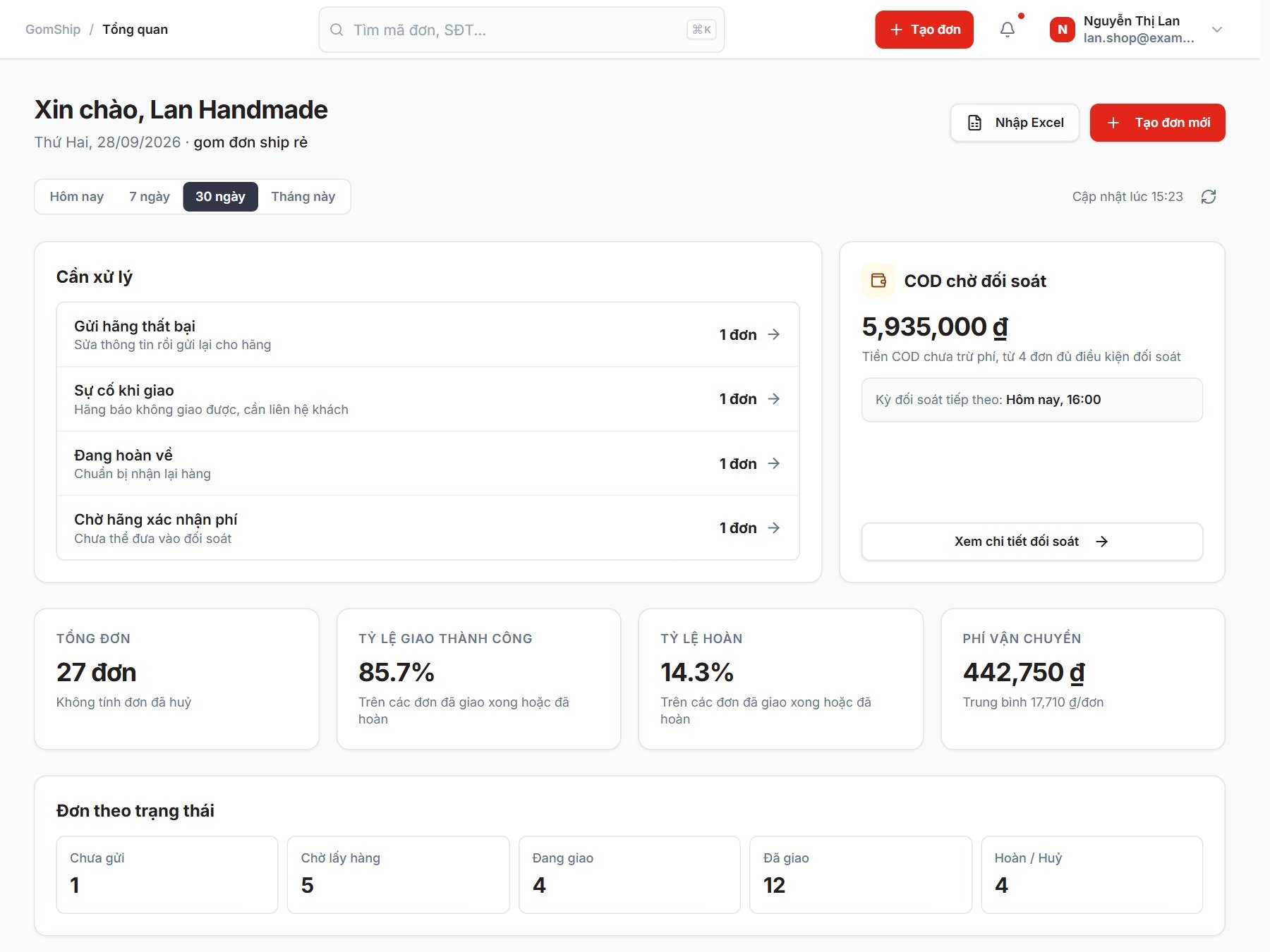
The shop Overview page on GomShip: tasks to handle, COD awaiting reconciliation and order figures (interface shown in Vietnamese)
The shop management interface · Sample data
FOR ONLINE SHOPS, EVERY DAY.Lower shipping fees. Keep more for your shop.

CARRIER CONNECTIONS

Good rates from major carriers.
One place to ship from.

  • BEST Express
  • SPX Express

Available carriers and services are shown
based on your account and shipping route.

SHIPPING RATES

Bundle orders to ship cheaper.
See your shop’s exact price.

GomShip pools orders from many shops to get better rates from the carriers. The exact rate depends on the route, weight, dimensions and service. Sign up to see the price that applies to your shop when you create an order.

Sign up to see your shop’s rates

BEFORE YOU CREATE AN ORDER

Have a few simple details ready

  1. 01
    Pickup & delivery points

    A full address helps determine the correct shipping route.

  2. 02
    Parcel details

    Weight, dimensions, goods value and COD amount.

  3. 03
    Carrier & service

    See the displayed rate and choose the service that suits the order.

The rate may be adjusted based on actual weight and size measurements and any additional fees that apply to the order.

MORE THAN CHEAP SHIPPING

Cheaper shipping.
Tidier management too.

From creating orders to COD reconciliation, your shop’s daily work lives in a single account.

01 / CREATE ORDERS

One order or a whole list.
A few clicks either way.

Create orders one at a time, or import a list from Excel. Manage sender, recipient and goods information right in the dashboard.

Order list.xlsxExcel import · Check details · Create orders
02 / TRACK ORDERS

Know where each parcel is.
Stay ahead of the next step.

Follow shipping status in the order list so it is easy to check and handle the orders that need attention.

Awaiting pickupIn deliveryDelivered
03 / COD RECONCILIATION

Every amount clear.
Easy to follow your money.

See COD, shipping fees and payment status for each reconciliation session. Manage the bank account that receives your money in one place.

Ship from any warehouse.Save and manage multiple warehouse addresses so you can pick the right pickup location when creating an order.

GET STARTED WITH GOMSHIP

From sign-up
to your first order.

You start on your own terms, whenever you are ready.

  1. 01

    Create your shop account

    Sign up with your own details to enter the GomShip dashboard. No need to contact us to open an account.

    Sign up now
  2. 02

    Add a pickup address

    Save your warehouse, sender and phone number to use when creating orders.

  3. 03

    Create orders and ship

    Enter the order details, view the rate and choose a suitable service. Print the label, pack the parcel and hand it to the courier.

YOU MAY BE WONDERING

Before you
start shipping.

Why is shipping through GomShip cheaper?

GomShip pools orders from many shops, so it can negotiate better rates with the carriers than a shop shipping on its own. The exact rate depends on the route, weight, dimensions and service; you can see the price that applies to your shop on the order creation screen.

Do I need to contact you to open an account?

No. Choose “Sign up now”, fill in your details and create an account directly. After signing up successfully you go straight into the dashboard to set up your shop.

Does GomShip deliver the parcels itself?

GomShip is a platform that helps shops create and manage waybills. Pickup and delivery are carried out by the carrier selected on the order.

Where do I see shipping rates?

On the order creation screen, enter the pickup and delivery addresses and the parcel details to see the rates that apply to your account and the services available to you.

Can I create many orders from Excel?

Yes. The dashboard has a bulk order feature. Download the Excel template, fill in the details, then upload it to check and create the orders.

How do I track COD money?

The Reconciliation section shows each session with its orders, COD, fees and payment status. You can manage the bank account that receives your money and view the reconciliation schedule in your account.

THE GOMSHIP APP

Available on both
Android and iOS.

Create orders, track shipments and get notifications right on your phone. Log in with the same shop account you use on the web.

QR code to download the GomShip app
Scan with your phone camera. It opens the App Store on iPhone or Google Play on Android.

GOMSHIP · BUNDLE ORDERS, SHIP CHEAPER

Your next order,
shipped cheaper with GomShip.

You focus on selling. GomShip gets you better shipping rates.

Create an account now

Already have an account? Log in